BEAS SINGLE and UNIQUE SERIAL COMPONENT ASSIGNMENT IN MULTIPLE PRODUCTION POSTING POR SERIAL MANAGED FATHER Respondida

HI EXPERT,
I'm facing this scenario:
Item X = father = serial managed
item Y = child = serial managed
use 1Y per 1X
production order for 5 pcs of article X with pre assignement of serials for father X
( es 1;2.3;4;5) at Wo creation
then
reservations for item X with serial ( A;B;C.D;E).
I need to know how it cold be possible to get the information of which serial child was really used in production for each father
If I post the full production, 5 pcs of father X, I can see only which chid' serial X have been used in production, , but not the real match between them as really used
for ex: 1A - 2D .....5B
It works for sure by doing 5 single postings ... but Is It possible in some ways?
Could it be a possible future development?
Customer is an electronic company and needs to trace every component for future service assistence
Thank you very much for you help.
Massimo
Comentarios
2 comentarios
Hi
1. activate serial number reservation
To make possible the assignment of material-serial number to batches, at Material posting > backflushing the option "also post batches/serial numbers" needs to be set to "manually" .
if you create new work orders, the system reserve serial numbers for the assembly
1. mark the line of assembly serial number
2. on left window choose the material serial number. The system move this line to right side and assinged this to the assembly serial number
if you make an issue, you can define, for which serial number you will link which serial number from material
if you make the receipt, beas save the link information
1. In issue document (Serial number 68 is inside 81)
2. in receipt document : 81 is linked with po_serman serial 68
in Serial number tracer you can see same information
You can modify this later too (for existing work orders)
right click on the receipt document
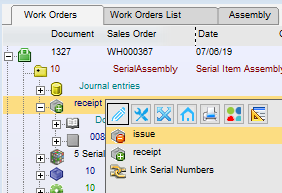 Link serial numbers
in this window you can define the link between the material and assembly
More about this window see
http://www.beascloud.net/docs/help/online_eng/index.html?fert_allocation_batchsernum_list1.htm
regards
Martin Heigl
Nice additional information
- Technical Video about Batch Tracer https://youtu.be/MeKVk-ZTI48
- Tutorial http://www.beascloud.net/docs/help/beas_tutorial/index.html?11_16.htm
- Tutorial Reservation of serial numbers http://www.beascloud.net/docs/help/beas_tutorial/index.html?reservation_of_serial_numbers_.htm
Iniciar sesión para dejar un comentario.