Add field Respondida

Hello,
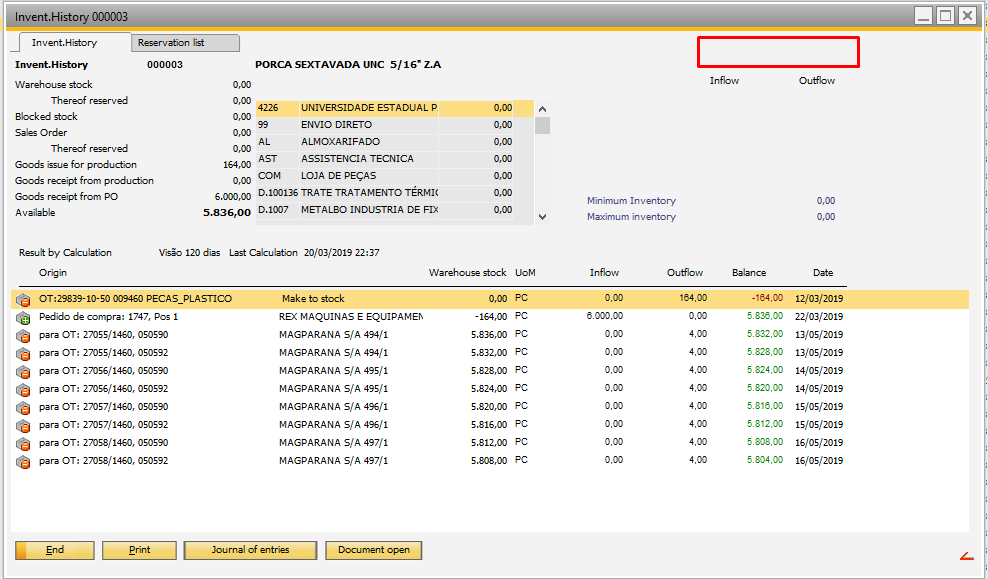
I need your help, on the inventory inventory screen, I need to put information that contains the item's registration in a field on this screen.
Attached is an image where I have to put this information.
Can someone help me.
Thank you
Joao Antonio
Comentarios
3 comentarios
Hi
the red marked area is the dw_master area
with beas script it's possible to insert information with text fields
dw_master.create=text=x=2000<tab>y=0<tab>text=hello<tab>name=hello_t
Hi martin
I ran the test with your example and it worked perfectly
How do I put this information under the column AVAILABLE.
I tested like this and it did not work out.
dw_1.item.create =text=x =2900<tab>y=300<tab>text=Weld Address<tab>name=end3
dw_1.create=text=x=2900<tab>y=300<tab>text=Weld Address<tab>name=end4
Important: delete all spaces between every property
In Inventory window we've a special case: The top of the list is the "HEADER" area from dw_1
you can write objects in header area, if you define the property "band=header"
dw_1.create=text=x=2900<tab>y=300<tab>text=Weld Address<tab>name=end3<tab>band=header
Iniciar sesión para dejar un comentario.