UF Line Loop / External Launcher - Copy File from path in line to directory Respondida

We have an UDO with lines in it and in this lines are file-pathes and we want to use the pathes to copy the file into a new destination (like an file-export).
Is that possible with line loop in combination with external launcher or something? Some experience with those things?
Comentarios
8 comentarios
Move to Questions and Answer Sections as it is not a feature request.
As for the question I can't see why not but I do not have a specific sample on it so I would instead recommend you see this Feature Focus session: https://youtu.be/dsgZmz-XE7U (Design of line loop have changed a bit since the session but the functionality works the same so still valid)
Sorry for my mistake with this Community article. For grapping the path from the line, line loop works, but my problems are the steps after that. How can I use the grapped path to copy a file from one directory to another?
You should be able to do UF - External Launcher as Line Pass UFs and in the External Launcher use the Dynamic Syntax (https://help.boyum-it.com/B1UP/appendix-1---dynamic-syntax.html) to get the path
OK, I understand, but what can I do to copy the file from the path from this place/directory to a specific place/directory in Windows. The customer had coresuite before with a function button with C# in it to do this. But I´m searching for an alternative.
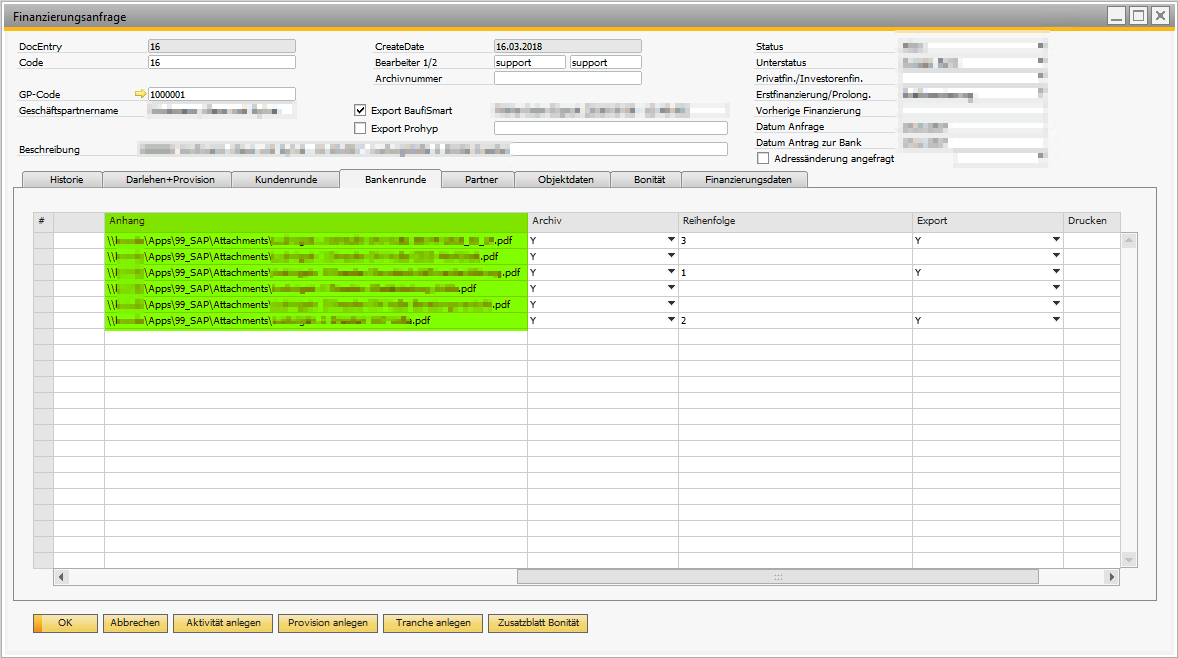
From the files rows in the screenshot only the file in column export set to Y should copied. What do you think is it possible and with which external program?
Guess you can use Windows XCopy command in the external launcher: https://docs.microsoft.com/en-us/windows-server/administration/windows-commands/xcopy ... or if more advanced make a.bat file.
If you want to control everything yourself you can also use UF - Dynamic Code and do it using C# Code (https://help.boyum-it.com/B1UP/dynamiccodenetsdk.html)
Hi Rasmus, we are no C#-Developer and your collegues don't customize for customers, so they said. Because we had an C#-Code from the CoreSuite-function-Button.
StatusBar.StatusRotatorInfo sri = new StatusBar.StatusRotatorInfo("Dokumente werden exportiert", StatusBar.StatusRotatorInfo.StatusTypes.Warning);
try
{
if (pVal.Form.Mode != SwissAddonFramework.UI.Components.ModeComponent.FormModes.OK)
{
StatusBar.WriteError("Diese Funktion kann nur im OK-Modus (Änderungen gespeichert) ausgeführt werden");
}
else if (pVal.Form.PaneLevel != 3 && pVal.Form.PaneLevel != 4)
{
StatusBar.WriteError("Diese Funktion kann nur auf den Registern 'Kundenrunde' und 'Bankenrunde' ausgeführt werden");
}
else
{
string strCode = TextEdit.GetFromUID(pVal.Form, "2_U_E").Value.ToString();
string strTable = "";
string strSQL = "";
//Get relevant Table for query
if (pVal.Form.PaneLevel == 3)
{
strSQL = @"SELECT U_X_ANHANG AS Anhang
FROM [@X_FA_DOKUMENTE1]
WHERE Code = {0} AND U_X_EXPORTIEREN = 'Y' AND ISNULL(CAST(U_X_ANHANG AS nvarchar), '') <> ''
ORDER BY ISNULL(U_X_REIHENFOLGE, 9999) ASC, ISNULL(CAST(U_X_ANHANG AS nvarchar), '') ASC";
}
else
{
strSQL = @"SELECT U_X_ANHANG2 AS Anhang
FROM [@X_FA_DOKUMENTE2]
WHERE Code = {0} AND U_X_EXPORTIEREN2 = 'Y' AND ISNULL(CAST(U_X_ANHANG2 AS nvarchar), '') <> ''
ORDER BY ISNULL(U_X_REIHENFOLGE2, 9999) ASC, ISNULL(CAST(U_X_ANHANG2 AS nvarchar), '') ASC";;
}
strSQL = string.Format(strSQL, strCode);
Debug.WriteMessage(strSQL, SwissAddonFramework.Messaging.Debug.DebugLevel.Always);
using (System.Data.Common.DbDataReader sdr = SwissAddonFramework.Utils.SQL.ExecuteReader(strSQL))
{
if (sdr.HasRows == true)
{
SwissAddonFramework.Utils.Windows.SaveFileDialog svd = new SwissAddonFramework.Utils.Windows.SaveFileDialog();
svd.FileName = "Speicherpfad (nicht anpassen)";
svd.FileSetEvent += new SwissAddonFramework.Utils.Windows.SaveFileDialog.FileSetHandler(delegate(string path)
{
sri.Start();
while (sdr.Read())
{
string strOriginalLocation = "";
strOriginalLocation = sdr["Anhang"].ToString();
string strFileName = "";
strFileName = strOriginalLocation.Substring(strOriginalLocation.LastIndexOf(@"\") + 1);
//Will save documents in the order which is defined in SQL-query
path = path.Substring(0, path.LastIndexOf(@"\") + 1);
if (System.IO.File.Exists(strOriginalLocation) == true)
{
System.IO.File.Copy(strOriginalLocation, path + strFileName, true);
}
else
{
StatusBar.WriteError("Der folgende Anhang konnte nicht gefunden werden: " + strOriginalLocation);
}
}
StatusBar.WriteSucess("Anhänge wurden exportiert");
sri.Stop();
});
svd.ShowDialog();
}
else
{
StatusBar.WriteError("Es konnten keine Anhänge gefunden werden, die exportiert werden müssen");
}
}
}
}
catch (Exception ex)
{
string errorMessage = string.Format("Error in {0} Rule '{1}': {2}", pVal.RuleInfo.RuleType, pVal.RuleInfo.RuleName, ex.Message);
MessageBox.Show(errorMessage, "OK");
StatusBar.WriteError(errorMessage);
Debug.WriteMessage(errorMessage, Debug.DebugLevel.Exception);
}
finally
{
sri.Stop();
}
Hi ,
We use it exactly like Ramus suggested, external launcher.
see below :
Good luck !
Nice example, Thanks! We try it...
Iniciar sesión para dejar un comentario.