Using "e_qscardcode" in QC Item-Inspection plan linkage Respondida

Hi all,
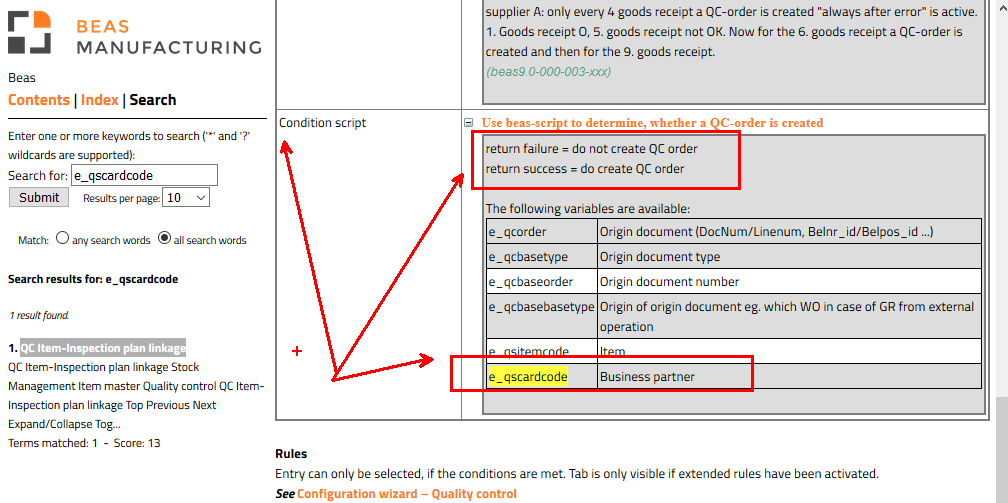
According to the Beas manual
http://www.beascloud.net/docs/help/online_eng/index.html?qc_item_link.htm
I can use some variables in the "condition script" field, how do I use the e_qscardcode variable in an SQL function? my function already returns success or failure
Example:
select [dbo].[GeneratePlanBeas] ('C000399') return "failure"
select [dbo].[GeneratePlanBeas] ('C0003991) return "sucess"
I tried to use it like this but it didn't work.
select [dbo].[GeneratePlanBeas] (e_qscardcode)
Rgs
Fabio.
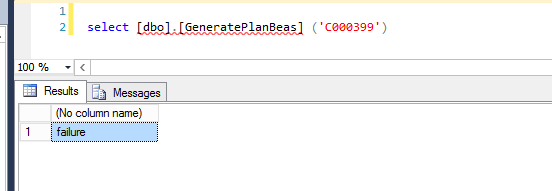
return invalid column name, he didn't interpret it as the PN code

Comentarios
2 comentarios
Hello Fabio,
I'm afraid that you can't set a value by default in the QC windows, the only option is using beas script.
I did it, but I wanted to use the SQL return to use in the "return" but I couldn't, I had to do an "IF"
Is there no way to leave this default command for all inspection plans?
Rgs,
Fabio
Iniciar sesión para dejar un comentario.