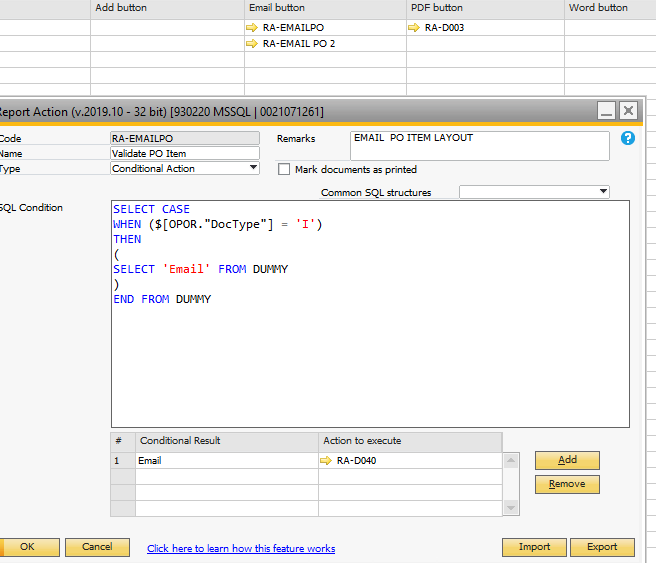
I am testing the value of the OPOR table doctype if 'I' to execute the function else do not. This all part of the effort to print 2 different CR based on OPOR type Service vs Item
This last question is more SQL related, according to your query the system will execute the action that corresponds, I suggest you check SQL tutorials online. =)


Comentarios
6 comentarios
Hi ,
Try the following :
SELECT CASE WHEN $[OPOR.DocType]='I' THEN 'IValue'
WHEN $[OPOR.DocType]='S'
THEN 'SValue' END
I think the double quotes killed your query .
Good luck !
Moved to Q&A as this is not a Feature request.
Seems like you have an issue in the dynamic syntax. Please see how dynamic syntax work here: https://help.boyum-it.com/B1UP/appendix-1---dynamic-syntax.html
I am testing the value of the OPOR table doctype if 'I' to execute the function else do not. This all part of the effort to print 2 different CR based on OPOR type Service vs Item
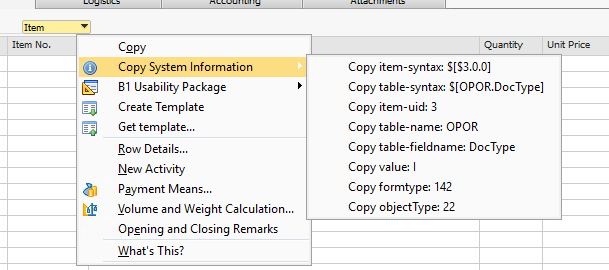
Please advise on correct syntax
Please let me review the challenge with the team. We use Print and Delivery module and we have different layouts / forms in SAPB1 for Purchase Orders
. One for service item and one for Inventory Items. So first step I set up 2 forms as indicated below for the print preview button
On the Print Preview have the RA-PO condition which is as follows:
should execute the preview action RA_D002 only if PO Type is 'I".
If not should try the next line where the condition check is for pO type 'S'
when I try to do preview I get error below
Issue resolved thanks to the input of Nadav Caridi
SELECT CASE WHEN $[OPOR.DocType]='I' THEN 'IValue'
WHEN $[OPOR.DocType]='S'
THEN 'SValue' END
Now if I knew how to apply conditions on the type of document type to printed when added based on certain filed values would be great
Example: I want to print the Delivery Document when added but only if it is of a Service type and has a UDF value='something'
Hello,
This last question is more SQL related, according to your query the system will execute the action that corresponds, I suggest you check SQL tutorials online. =)
Iniciar sesión para dejar un comentario.