B1UP -Macro in Bin Location Allocation window on Delivery Note Respondida

Dear All,
i have a scenario where i would like to Transfer Information from a User query to the Bin Location allocation Window on the delivery note.
Right now i just try to click on the different elements on this screen, and there is a black triangle used for moving from on line to the other. See attached:
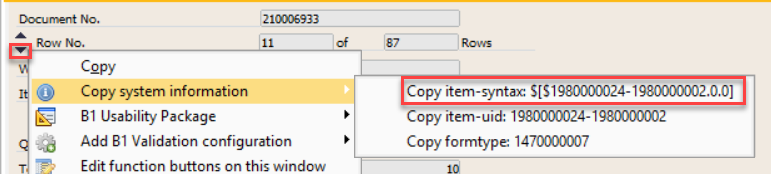
As you see the item syntax is: $[$1980000024-1980000002.0.0]
And This is what i have in the Macro UF
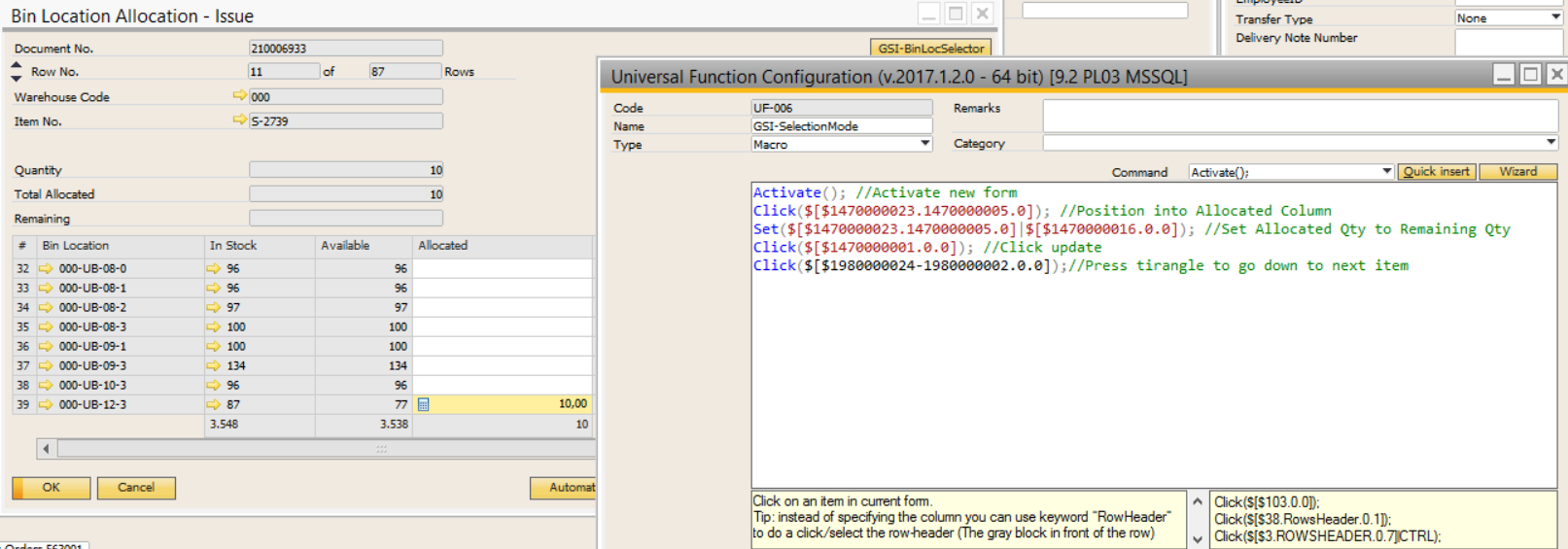
After executing this is what i get from the debugger
1980000002.0.0]);//Press tirangle to go down to next item;
16:10:43 Exception in macro: System.Exception: Could not find Item with UID: "$[$1980000024-1980000002.0.0]" on Form: 1470000007 (Bin Location Allocation - Issue)
[Macro Command: Click($[$1980000024-1980000002.0.0])]
Macro Enviroment parameters:
[Current Form: 1470000007 - Bin Location Allocation - Issue]
[Source Row: -1] [Target Row: -1] [Break: False] [Initial FormType: 1470000007] [B1UP Version: 2017.1.2.0]
---> SBO.ItemException: Could not find Item with UID: "$[$1980000024-1980000002.0.0]" on Form: 1470000007 (Bin Location Allocation - Issue) ---> System.Runtime.InteropServices.COMException: Item - Invalid item [66000-3]. Form Unique Id: 'F_588', Item Unique Id: '$[$1980000024-1980000002.0.0]'
at SAPbouiCOM.ItemsClass.Item(Object Index)
at SBO.UI.FormItemCollections.ItemCollection.GetItem(String itemUid, Boolean throwOnError)
--- End of inner exception stack trace ---
at SBO.UI.FormItemCollections.ItemCollection.GetItem(String itemUid, Boolean throwOnError)
at SBO.UI.FormItemCollections.ItemCollection.GetItem(String itemUid)
at SBO.UI.FormItemCollections.ItemCollection.get_Item(String itemUid)
at UniversalFunctions.Functions.Macro.Control.ClickController.ClickCommand(IFunctionActivationArguments activationArguments, String arguments, Boolean doubleClick) in C:\TFS\B1 Usability Package\Main\Source\Code\Modules\UniversalFunctions\Functions\Macro\Control\ClickController.cs:line 53
at UniversalFunctions.Functions.Macro.Function.ActivateMacro(IFunctionActivationArguments activationsArguments, String macro) in C:\TFS\B1 Usability Package\Main\Source\Code\Modules\UniversalFunctions\Functions\Macro\Function.cs:line 238
--- End of inner exception stack trace ---
at UniversalFunctions.Functions.Macro.Function.ActivateMacro(IFunctionActivationArguments activationsArguments, String macro) in C:\TFS\B1 Usability Package\Main\Source\Code\Modules\UniversalFunctions\Functions\Macro\Function.cs:line 401
at UniversalFunctions.Functions.Macro.Scripter.Functions.Root.DoWork() in C:\TFS\B1 Usability Package\Main\Source\Code\Modules\UniversalFunctions\Functions\Macro\Scripter\Functions\Root.cs:line 41
at UniversalFunctions.Functions.Macro.Scripter.View.DebuggerForm.ScriptWorkerDoWork() in C:\TFS\B1 Usability Package\Main\Source\Code\Modules\UniversalFunctions\Functions\Macro\Scripter\View\DebuggerForm.cs:line 226
16:10:43 Macro completed. Please close the debug window to continue working in SAP!
Can someone please share some tips?
Thank you.
Kind regards,
Otto
Comentarios
1 comentario
Hello Otto,
The Dynamic Syntax of that field is not supported, as you can see, the system displays that line in black. I'm afraid that this is due SAP's limitation.
Iniciar sesión para dejar un comentario.