Batch Calculation- Warehouse Filtering

Hello,
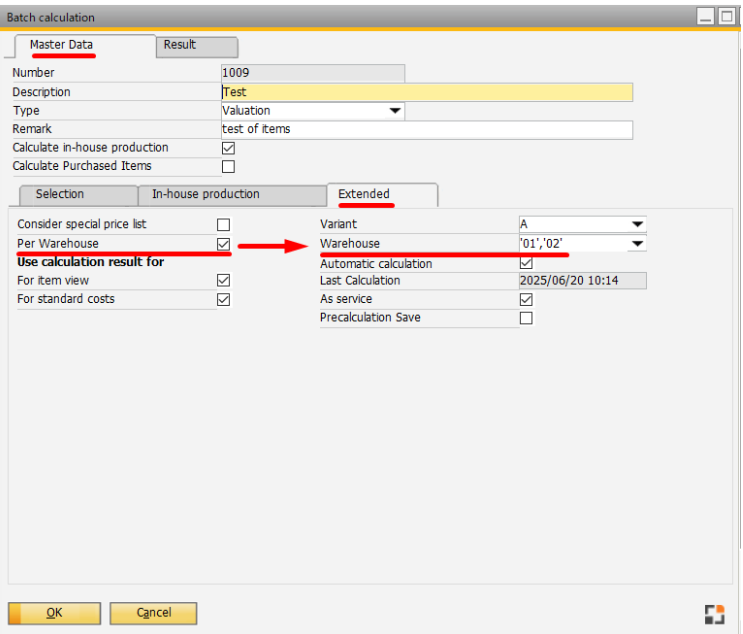
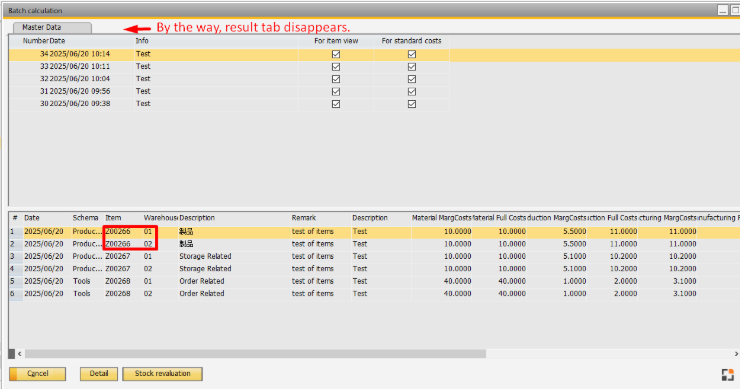
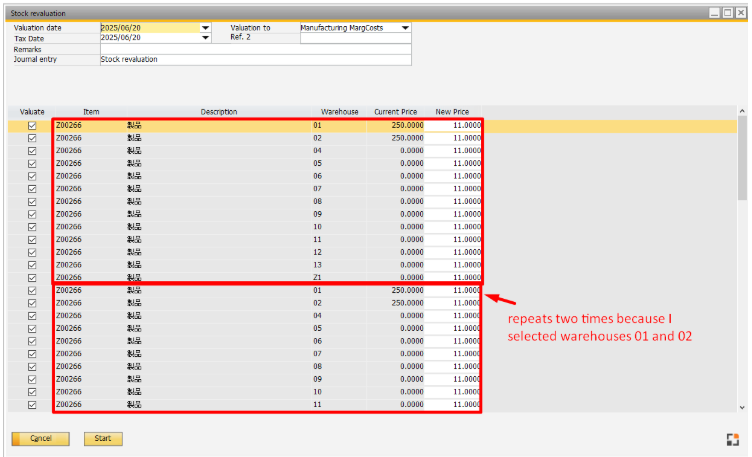
In the Batch Calculation function, warehouses can be filtered using the extended tab. For the given items, in the batch calculation's Result tab each item is displayed with its respective filtered warehouse(01 and 02). However, when pressing the button [Stock Recalculation] a strange behaviour happens in the stock valuation screen. First, The item is repeated for the number of warehouses that were selected in the extended tab (2 times). Second, all the warehouse are displayed. Note that if the item is duplicated an error is displayed if you try to revaluate the item.
Should not the filter work for this screen as well and show only the filtered warehouses? Is this item duplication a bug?
***I placed this inquiry here as I was told to do so by the Boyum's support team***
Will appreciate any help.
Carlos
1. Batch Calculation
Batch Calculation>Extended tab>Per warehouse> Warehouse
2. Batch Calculation> Result tab (whs 01, whs 02)
*note that the Result tab disappears
3. Stock Valuation
Item repeats responding to the number of warehouses defined in the filter (for this example, 2 warehouses (01, 02) were selected so item repeats 2 times)
4. Duplicated items generate errors when trying to revaluate them

Comentarios
0 comentarios
Iniciar sesión para dejar un comentario.