Approval Template

Good day,
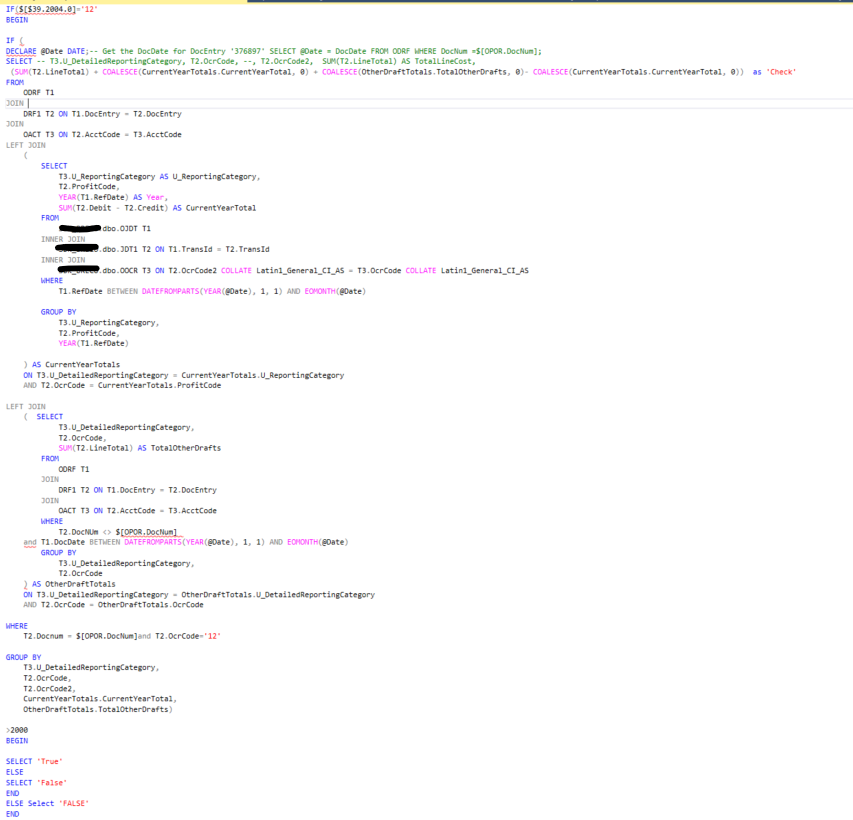
I am trying to trigger an approval on a SQL query. I have two If statements; the draft doc needs to have a Department 12 And the Calculated check must be bigger > 2000, it needs to trigger approval.
When I run in SQL, I can see both statements are met, but no approval gets triggered.
Is there something wrong with my Dyanmic Syntax/Placement of if statements? Any advise will be helpful.
Comentarios
3 comentarios
Hey Carla,
I'm not going to say I understand what you mean by triggering an approval however it appears to me that the >2000 is simply hanging out there by itself without belong to a where clause to indicate what it is being compared to.
Hi Geoff,
When I add the query on SAP, and link it to an approval template, like the above screenshot it does not work. Most probably as you mentioned that its not confined to the IF statement. How do I write it in an if/case statement that the system know they need to use the result of the sql query to do the check.
Also, is there any way I can get a docentry before a Purchase order gets added. So before the draft is even created. I have tried with docnum's dynamic syntax but its not unique.
Or alternatively, if I use the B1 Validations to get the Docentry ($[NEWID] ) after its posted, how do I still get it to potentially update the UDF on the docentry just added.
It sounds like you are trying to use core SAP approvals. If that is the case here is the SAP logic flow:
Boyum should not be required as you can't have Boyum trigger an approval with using the DiAPI to create the draft document (very complex).
Your approval logic seems very complex. Is there any way to simplify it?
Iniciar sesión para dejar un comentario.