Close is Bugging system Respondida

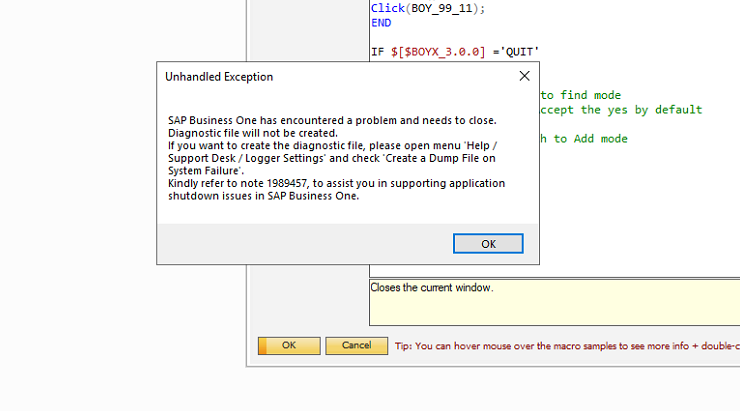
Closing sap creating dumb file when using Close(); in macro
IF $[$BOYX_3.0.0] ='QUIT'
BEGIN
Activate();
Activate(1281); //switch to find mode
AutoPressNextPopup(2);//Accept the yes by default
Close(); //Activate(1282); //switch to Add mode
END
END
Comentarios
11 comentarios
Activate(); So you activate the current open form - should be OK
Activate(1281); //switch to find mode - should be OK
AutoPressNextPopup(2);//Accept the yes by default - What is this popup ? Is it closing the form
Close(); //Activate(1282); //switch to Add mode
I suggest you turn on debug mode and navigate line by line to see what is happening
Hi Geoff ,
thanks for your suggestion
i tried many ways , once it come to close its bugging system
I still don't understand what you are trying to do. You need to provide more details such as:
Hi Geoff,
Cutomer want system to work with scanning , so ass soon they scan close , it should close user defined form.
all comments you seen there is my trys to avoid that
I'm still not understanding,
Hi geoff ,
As simple , i need a user defined form to close with b1up validation .. form data no need to save..
Try running the Close() on a core SAP form to see if it functions as expected.
If it does then the issue is in your user defined form .
The only code I would have in the UF to test is Close(); as nothing else should be needed.
i tried just simple close as initial step its bugging system
This worked fine for me on a basic SAP Purchase Order. The PO form closed as expected.
Hi normal form will close without any issue .. could ypu please try user defined form
I opened a user-defined window; added the same right-click menu item and it closed the form without error.
I'm using SAP 10 SP 2408 & B1UP 2024.10
Iniciar sesión para dejar un comentario.