Macro is not working

Macro error in UF-010: System.Exception: Dynamic keyword error from Keyword '$[$BOY_1.S.O.0]' (Remember Dynamic Syntax is case-sensitive) - Could not find Item with UID: "BOY_1" on Form: 139 (Sales Order) | [Current Form: 139 - Sales Order]
[Parent For
i tried to copy data from query screen to Sales order based on check or uncheck , but throwing error like this

Comentarios
15 comentarios
Please post the contents of your macro and the validation calling it. There isn't enough information here to assist.
i tried lineloop
Freeze();
Transfer($[$38.1.0]|$[$BOY_1.Code.0]); //Transfer itemCode Transfer($[$38.11.NUMBER]|$[$BOY_1.Qty.0]); //Transfer Quantity Transfer($[$38.14.0]|$[$BOY_1.Price.0]); //transfer cost
UnFreeze();
StatusBar($[$BOY_1.Customer.0]|information);
@STORE1=$[$BOY_1.Customer.0];
Activate(2050); -- Open S0
Set($[$4.0.0]|@STORE1); -- Set BP Code
It appears to me you are trying to query items in order to provide a quick selector screen to then quickly build a Sales Order.
I would start by creating an SQL Report based on your query. Modify the SQL report to identify which fields you want to return to the sales order (Good training videos on-line for this)
The process would then be:
1) Open a Sales Order
2) Fill in the customer info
3) Launch the new SQL Report (Via button or right-click menu)
4) Select the items you wish to add and then click Choose
Hi, Is Uf-022 inserting the BP Code data? If yes, Try this in your UF-010
Replace your fields.
Share your results
regards
Alessandro.
This is not working ,
StatusBar($[$BOY_1.Customer.0]|information);
@STORE1=$[$BOY_1.Customer.0];
Activate(2050); -- Open S0
Set($[$4.0.0]|@STORE1); -- Set BP Code
Line Loop
--Transfer($[$38.1.0.LAST]|$[$BOY_1.Code.0]); //Transfer itemCode
--Transfer($[$38.11.NUMBER.LAST-1]|$[$BOY_1.Qty.0]); //Transfer Quantity
--Transfer($[$38.14.0.LAST-1]|$[$BOY_1.Price.0]); //transfer cost
setting data from query to Sales order which gives error , please help a way to solve this
Macro error in UF-010: System.Exception: Could not find Item with UID: "BOY_1" on Form: 139 (Sales Order) [Macro Command: StatusBar($[$BOY_1.S.O.0]|information)]Macro Enviroment parameters:
[Current Form: 139 - Sales Order][Parent Form: BOY_41
Check your Transfer commands. They should be Transfer (<source>|<target>);
Yours look backwards to me.
i tried both way , its not working . i tried to put simple validation based on first column , not even that works with same error
someone can assist or not ?
Turn on the debug mode for your UF's.
This will allow you to watch line by line what is happening which should help to troubleshoot.
Macro error in UF-010: System.Exception: Could not find Item with UID: "BOY_1" on Form: 139 (Sales Order)
[Macro Command: StatusBar($[$BOY_1.S.O.0]|information)]
Macro Enviroment parameters:
[Current Form: 139 - Sales Order]
[Parent Form: BOY_41
I tried all ways , its not reading form thats main issue #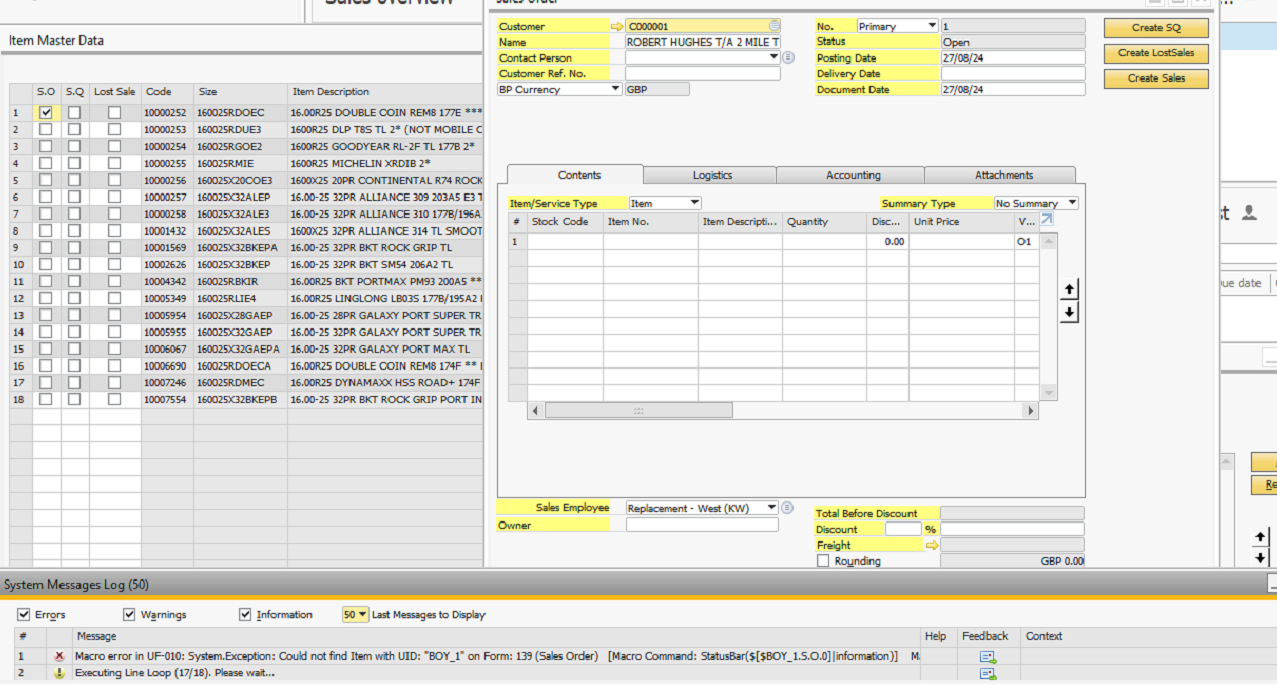
It's very strange; I have the same scenario and it works fine. As Geoff says, turn on debug mode to find the error line.
Regards
Alessandro.
could you please help with macro that used for line loop , from a query screen to sales order. or screenshot of scenario that you tried..
i can be available for a call , please help to solve this
If you use the SQL report as your selector you don't use a line loop. Fill in the Select Data Target info and the report will paste the data directly into the form you launched it from (a New Sales Order in this case). Check the Boyum help file for the correct syntax of the Data Target info.
Jobi, try this way, Instead of a simple condition, make it an SQL condition. It's possible that the format of the field marking an error is from the 'Item' field (BOY_1). In my example, I use an SQL condition that selects the first checkbox that has the value Y in the field $[$BOY_1.Select.0] (you have BOY_1).
Share your results.
Regards
Alessandro.
Iniciar sesión para dejar un comentario.