Error While Transferring Data from one window to other. Respondida

Hi,
I want to transfer Quantity data from AR Invoice Window to Batch Number Selection Window by while clicking Add Button on AR Invoice Window.
For this i used B1 Validation for Add Button and Universal Function with type of Macro and Function Type:
Transfer($[$38.11.0]|$[$4.4.0]);
After Pressing Add Button we have AR Invoice Warning Window "You Cannot this document after you have added it-Continue.?"
This window stopping the Transfer(); method and displaying the error which i have attached image.
Can any one please help me for this. thanks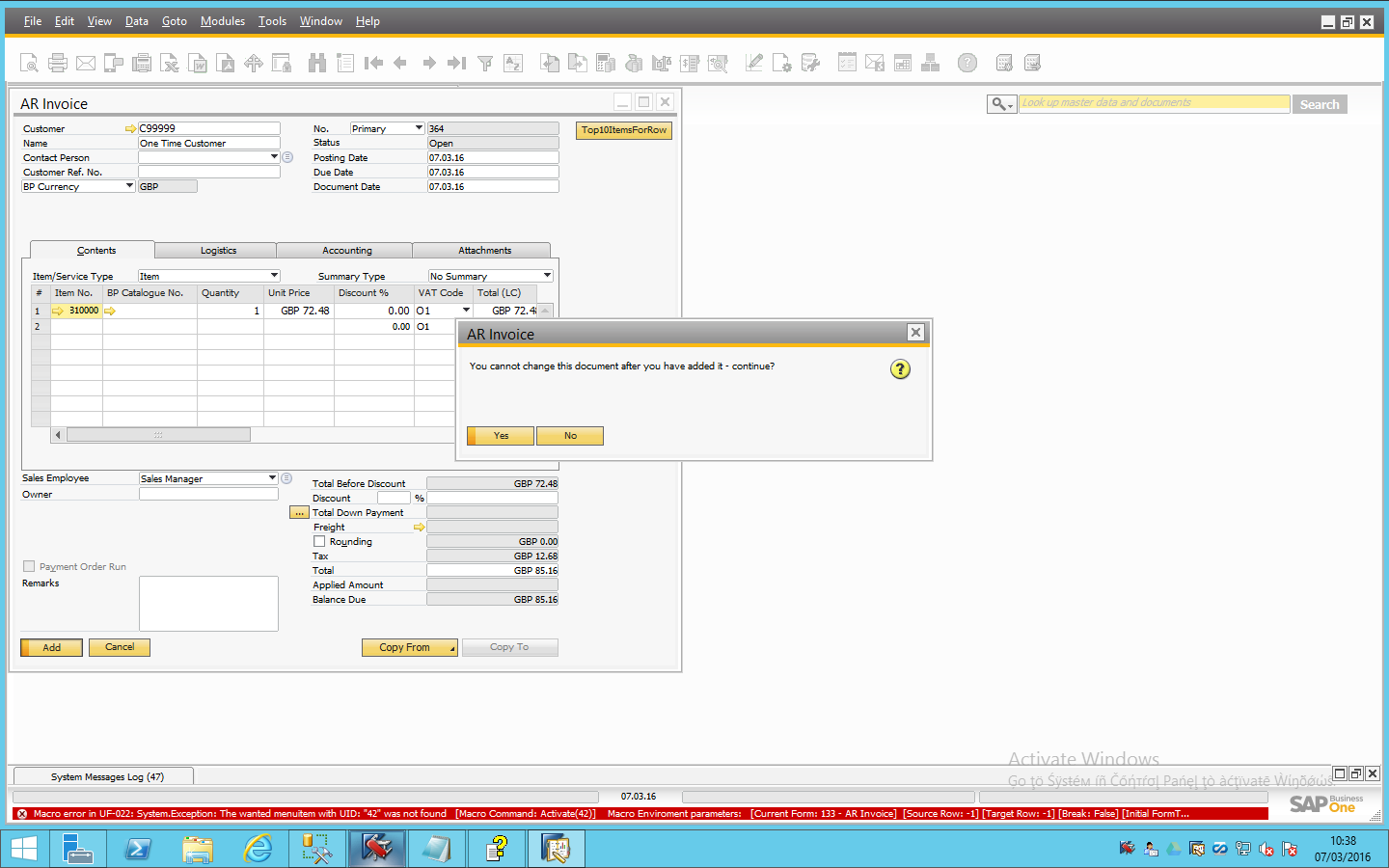
Comentarios
2 comentarios
Hi,
As a macro happens on the UI level, it is missing the functionality of opening the 'Batch Selection Window' using the activate(menuID) command:
* you can find the menuID by activating View > System Information
* Right click on the invoice and hover with the mouse over the batch selection option, in the button left corner of the screen you will find the relevant menuID which is the number you need to type in the activate command
Only once the above is completed, you can do a transfer.
Also, you have not attached the validation to see if 'Before Action' is set to 'True'.
Currently, your macro is trying to transfer a value to a form that does not exist on the screen, therefore you get the error: 'The wanted menuitem was not found...'
For more help, see our YouTube video on Macro.
Thanks, Naama
Hi there, I have a bit different issue. I can not transfer data to Purchase order from Item Master Data where I have my own table. If I am moving item to order if I specify row number to be 1 all goes well. Than I move and select last row to chose always new line, but new line can not accept data and showing error message in debug mode.
Here is first part what working well. I am runing this in LOOP mode where in first row opening new order and adding first data:
...
Transfer($[$5.0.0]|$[$38.1.0.1]); // Transfer OITM item code to order Transfer($[$IPT_0041G.Katal_cislo.0]|$[$38.2.0.1]); //Transfer also supplier code to order as well Focus($[$38.1.0.LAST]); //just move to next line -- in this case should be last one
Than in next step, where is called row data I was not possible to add data to table. In next step this row should be as second row (next one) but it looks like current row is -1 instead of 2.
Basicly adding more suppliers codes to order than just one and its not working, from same supplier.
Also this code do not work: Transfer($[$5.0.0]|$[$38.1.0])
Thx for any help,
Peter
Iniciar sesión para dejar un comentario.