Drill into SQL Report UF from SQL Report UF Respondida

Is it possible to Drill into a Universal Function SQL Report from another SQL Report?
We have a rolling 12 month Sales History with Months listed in columns. I would like to "Drill Into"each month to check on another SQL report i have written. It all works fine with hard coded data, but i want it to be dynamic.
For Example, I click on the Golden Arrow listed in "Jan"
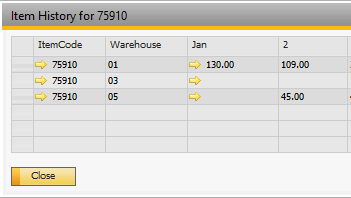
This SQL Query is run.
select T0.ItemCode, T3.CardCode, T3.CardName, Sum(T0.Quantity) as 'Qty'--, T3.DocNum
from INV1 T0
inner join OITM T1 on T0.itemcode = T1.itemcode
inner join OCRD T2 on T1.cardcode = T2.cardcode
inner join OINV T3 on T0.docentry = T3.docentry
WHERE
t3.canceled = 'n'
AND t0.itemcode = $[$BOY_1.ItemCode.0]
AND CONVERT(varchar,datepart(MONTH,t0.shipdate)) = 1
GROUP BY
T0.ItemCode, T3.CardCode, T3.CardName
But i get this error message.
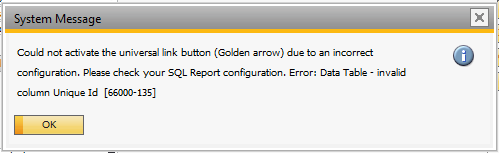
I took the $[$BOY_1.ItemCode.0] from this information

Is there another trick to this? Or is it not possible?
Thanks!
Rob
Comentarios
8 comentarios
Hi Rob,
I have tried to exact query in a similar scenario to yours but I do not get the error. If you can copy your sql configuration and format wizard to the post, I will be able to look further.
Thanks, Naama
Hi Naama,
This is the main Sales History config (i assume its what you're after?)
The format wizard config is here
And the Universal Function for the Monthly History
Hello Rob,
You need to define an specific row when you click in the Golden Arrow. Please try this 2 scenarios:
- Change your Dynamic Syntax to something like this:
$[$BOY_1.ItemCode.0.SELECTED]
Before you click in the golden Arrow select the line and the report will popup.
-Change the syntax to $[$BOY_1.ItemCode.0.FOCUSED] and try to open the report.
Hi Yaremi,
Still the same issue. I thought the "0" was the row number?
I have tried both scenarios listed above but still get the same error.
Can anyone assist with the answer to this?
Hello Rob,
The 0 corresponds to the type in this case alphanumeric. If the problem persist, I suggest you contact your local partner for more assistance.
I have contacted my partner who suggested i post on here as they were unsure of the error.
Is there anything else i can try? I have been playing around with this for a few weeks, everyone i ask said what i have "should work", but doesn't.
Is there a Boyum IT helpdesk i can contact?
Turned out to be a very simple issue. Boyum IT got back to me (thank you for the help!)
If anyone is curious, it was to do with the case of the text. It should have all been lower case, so "itemcode" not "ItemCode"
Iniciar sesión para dejar un comentario.