Automate Print Sequence

Hi all
I want to make the system to automatically print invoice in 2 different layout right after the invoice is added. The only available built-in function is Print Sequence. I try to use Macro command Activate(menuUid) and SendKeys() to automate the whole processes. And those commands should be trigger after the invoice is added.
I set the Trigger as below, but system said “cannot activate a disabled menu item”. I think that’s because the commands was triggered before the invoice is added, the Print Sequence menu is not enable when the invoice is still in Add mode.
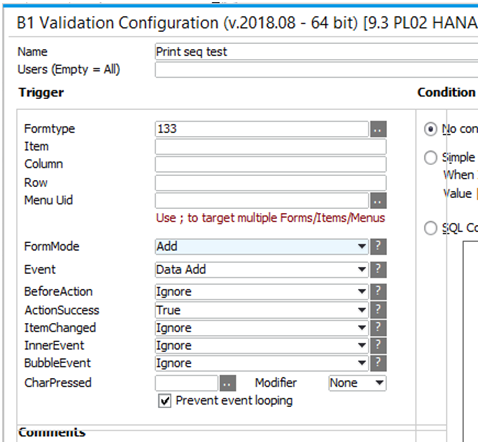
Any suggestion for how to set the trigger? Or any other work round?
Thank in advance.
System version 9.3 PL02
Alvin
Comentarios
4 comentarios
Hey Alvin,
Your validation is working (it has been triggered) as you are receiving the error message.
In 9.3 upon successful add of a document it immediately opens a new blank document therefore there is no data to print and the menu you are trying to activate is disabled. Therefore; you need to reopen the just added document before trying your print sequence.
In the UF you are calling you need to add code to make use of the B1UP $[NEWID] keyword. https://www.youtube.com/watch?v=KtMdxH0zCKY&feature=youtu.be
Something like
OpenForm(13|$[NEWID]); -- Open the AR Invoice form
Hi Geoff
Thanks for your advice, using $[NEWID] keyword can really help!
Is it possible to get document ID for a specific user by using the keyword? The reason I am asking is that. In a scenario of user A and user B adding a new invoice at almost the same time, let say user A's new document ID is 1000, and User B's new document ID is 1001. When the trigger start in user A's computer, because both new document were created almost the same time, is it possible the keyword return 1001 in user A's computer? If it is possible, can I use the $[NEWID] in SQL and use $[USERNAME] in where clause as filter?
Regards,
Alvin
I don't believe it is possible.
I have never run into a problem with this.
That will be great, thanks.
Iniciar sesión para dejar un comentario.