Universal Function golden arrow to addon data Respondida

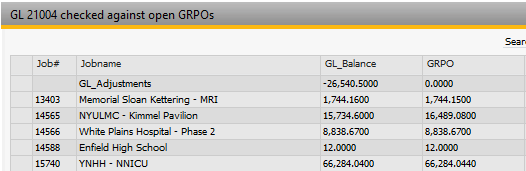
I have a UF for a SQL report that I would like to create a golden arrow to get more detail of a column that is totaling the GRPOs for a specific addon job #. I can write the second UF to query the data I need but am not sure how to construct the B1Up variable to point to the row in the original SQL report. Is this possible? In the example below, column 1 or Job# is what I want to pass to a golden arrow for column 4 to get the details of the GRPOs for the job# row.
Thank you for any guidance.
Comentarios
3 comentarios
Hello Ned,
In this case you need to add a Golden Arrow that will use a universal function type SQL Report, but in the where condition
you will use the Dynamic Syntax to send the value of the selected field and row.
For Example $[$BOYX_1.Job.NUMBER]
In this article you will find more information about Dynamic Syntax:
https://support.boyum-it.com/hc/en-us/articles/204284188-Guide-Understanding-Dynamic-Syntax
Thank you for the reply. I have read that article a couple times but don't understand the BOYX_1 syntax. It is not part of that article and I tried the dynamic syntax you mentioned but received an error. Below is the info from my SQL report that I want to use the golden arrow data to key on:
And this is the UF that is being called when the golden arrow is selected:
SELECT T1.Docnum, T.U_ENP_JOBID as 'JOB', SUM(T.OpenCreQty * T.Price) as 'GRPO_Balance'
FROM PDN1 T
INNER JOIN OPDN T1 ON T1.DocEntry = T.DocEntry
WHERE T1.DocStatus = 'O' AND T.LineStatus = 'O' AND T.AcctCode = 21004 and T.U_ENP_JOBID = $[$BOYX_1.Job.NUMBER]
GROUP BY U_ENP_JOBID, T1.DocNum
This question was solved by my VAR. He right clicked on the original UF SQL report field and selected:
Problem solved!
Iniciar sesión para dejar un comentario.