beas mrp: In beas 9.2 PL: 01 - MRP: The tab's in the View are not visible

With beas 9.2 PL: 01 you can define your filter with the makro system.
With this new function we don't need the tab's
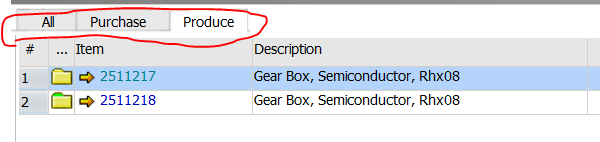
But if you want it, you can insert this with beas script:
//
windowevent formload
tab=text=1=All
tab=add=Purchase=this
tab=add=Produce=this
setvar=ls_mytabfilter=
setvar=is_mystartfilter=<is_startfilter>
end event

// Tab 1 = default Filter
windowevent click b_tab_1
setvar=ls_mytabfilter= <is_mystartfilter>
setvar=lb_reloadscript=true
end event

// Tab 2 = Purchase items
windowevent click b_tab_2
setvar=ls_mytabfilter= and ("OITM"."PrcRmntMtd"='B')
setvar=lb_reloadscript=true
end event

// Tab 3 = Assemlby
windowevent click b_tab_3
setvar=ls_mytabfilter= and ("OITM"."PrcrmntMtd"<>'B')
setvar=lb_reloadscript=true
end event

// Best event to change the filter
windowevent predesign
if <var:ls_mytabfilter> <> then
 setvar=is_startfilter= <ls_mytabfilter>
end if
// we must reload the script, because we loose our resize definition
if <lb_reloadscript> = true then
 post=batch=file=program\mrp_view_masterrahmen.src
 setvar=lb_reloadscript=false
end if
end event
This is only a workaround and is not working stable, if you work with templates in this window
In beas 9.2 PL: 6 you can set buttons on top of a window (with B1UP, only beas windows)
With this you can create a stable solution in very simple way.

Comentarios
0 comentarios
Iniciar sesión para dejar un comentario.