B1up Validation SetFieldValue not saved

Hi ,
I have a SQL validation , the validation works properly in terms of firing up the proper Universal Functions.
I can see the various fields are changed properly on the current order form , but when I go back to review the order I see all the changed values are changed back as if nothing was committed .
I use an Order form and my validation is add or update on form 139.
I tried pushing my validation down the line using a very high sort value to make sure no other validation runs and resets the fields after my validation ran.
Any insight is much appreciated.
Thank you .
Nadav.
Comentarios
11 comentarios
Have you checked the system messages log to see if there are any errors?
Have you tried turning on the "debug" mode of the UF and watch each step happen?
Is the Form Mode "Ok" after the function runs?
Hi.
Thanks for the reply.
Basically I try to check it when saving to draft.
Validation is set to data add/update. And it's fired alright since I have status bar info before each line on my uf macro that's being fired.
I haven't tried the debug I'll try that.
But if I setup the uf macro as a button and just click it it works just fine.
After the function runs the form is saved as draft. Hence it finished alright...
If you have added both a Bill To and a Ship To address you need the function to run on each address therefore it must fire multiple times not just once on add.
Hi Geoff
Thank you for the reply.
Not sure I fully understand the BillTo / ShipTo
But in my case it's all UDFS
they're all in tabs so I tried setting them both with copy item syntax and UDF syntax with setUDFSidebar
This exact same Macro works find with a function button click.
it replaces all fields just fine and I can add the draft manually .
Thanks
out of curiosity If you Do a simple UF
with (Replace my UDF with your udf moved to main form ...
Set it to Add or Update in Order Form 139 and fire it up with right click on "Save to Draft"
Does it work properly for you ?
It fails using the $[$fieldname.0.0] syntax however if I change it to $[$BOYX_xx] then both the form & sidebar fields are filled in correctly.
Thanks.
Yeah field are filled but not saved.
Turns out I was using save as draft and it wouldnt save the fields even tho they are changed visually.
I had to do a menu click validation
What version of SBO are you using?
I was using SAP 10 FP 2208 and triggering on Formtype 130 Item 2349990001 (Add draft button)
Code filled in both UDF's and saved correctly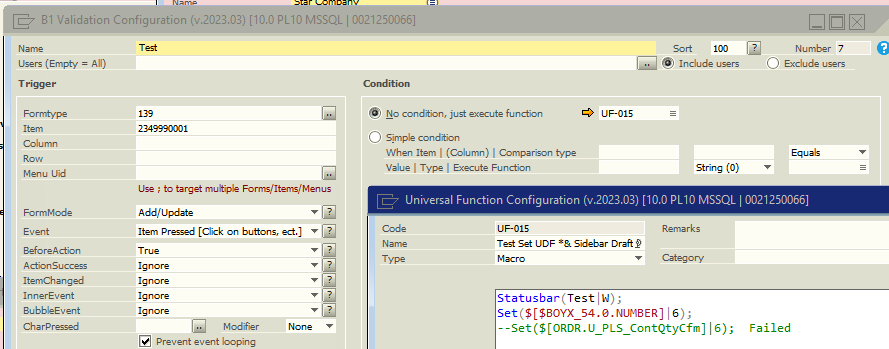
Hi.
Thanks.
I'm with sbo 9.3.
Yes if I limit it to the add draft menu item it works properly.
Problem is I'm using the validations for both drafts and orders.
And the regular order validation would be triggered unless I limit it to the add button. In which case it can be circumvented with the x button to save without the validation.
I just wonder If this is a sbo issue or b1up
Have you tried submitting a ticket to Boyum?
Iniciar sesión para dejar un comentario.