Job in B1UP Server Component don't working
Answered
Hi,
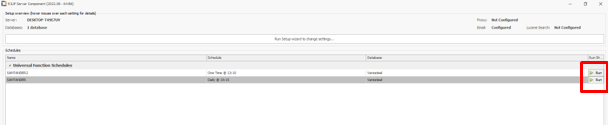
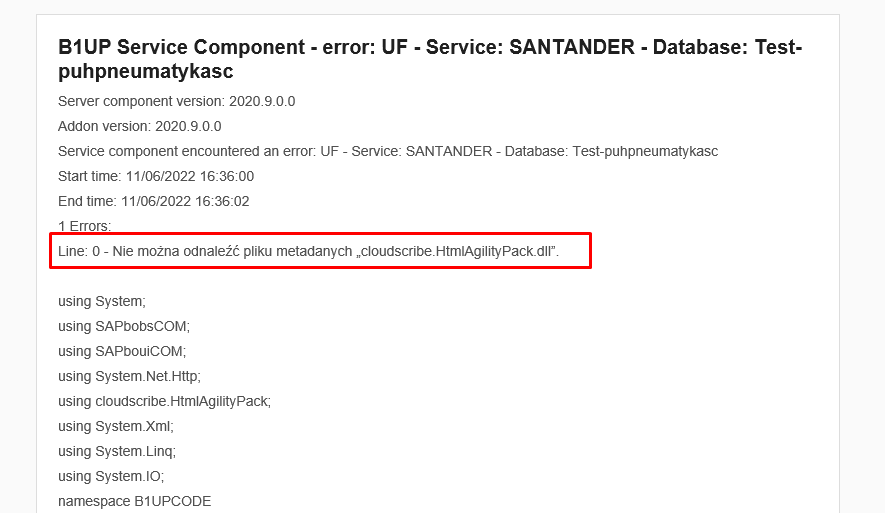
I prepare job in B1UP Server Component, but it not working. When I run the task manually it is OK, but the scheduled run is not working. It displays a message that the .dll library I am attaching to UF is missing. The same UF runs directly in SAP Business One and manually in B1UP Server Component.
I uploaded the library in the directory "C: \ Program Files (86) \ Boyum IT \ B1UP Server component" and in "C: \ Program Files \ SAP \ SAP Business One \ AddOns \ BOY \ B1 Usability Package". I also entered the definition of UF in the References and Using / Imports field. Should I additionally upload the .dll somewhere?
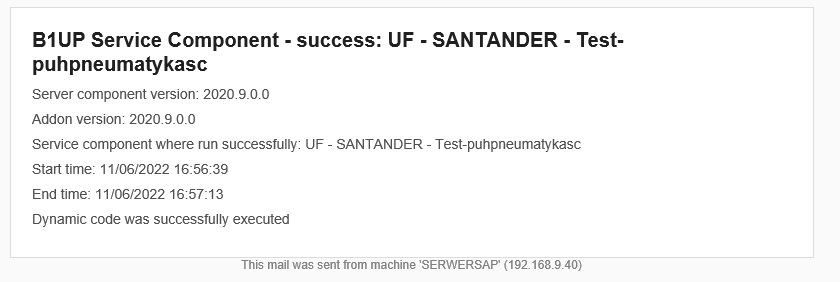
Attached are two responses from the B1UP Server component, one from manual run in the Run column, the other from the schedule run.
First case
second case
Best Regards,
Robert Semborski
-

Thank you for your request. It has been scheduled for review by the development team that will get back to you should there be questions.
(Please note that as we are user-driven we can't guarantee that your request will be met unless it gets many votes and/or fit the product vision)
Read more about the Feature Request process here
[Internal Id: 84094] -

same problem here:
4 Errors:
Line: 0 - Impossibile trovare il file di metadati 'DevExpress.Data.v22.2.dll'
Line: 0 - Impossibile trovare il file di metadati 'DevExpress.Drawing.v22.2.dll'
Line: 0 - Impossibile trovare il file di metadati 'DevExpress.Printing.v22.2.Core.dll'
Line: 0 - Impossibile trovare il file di metadati 'System.Drawing.Common.dll'
Please sign in to leave a comment.
Comments
2 comments